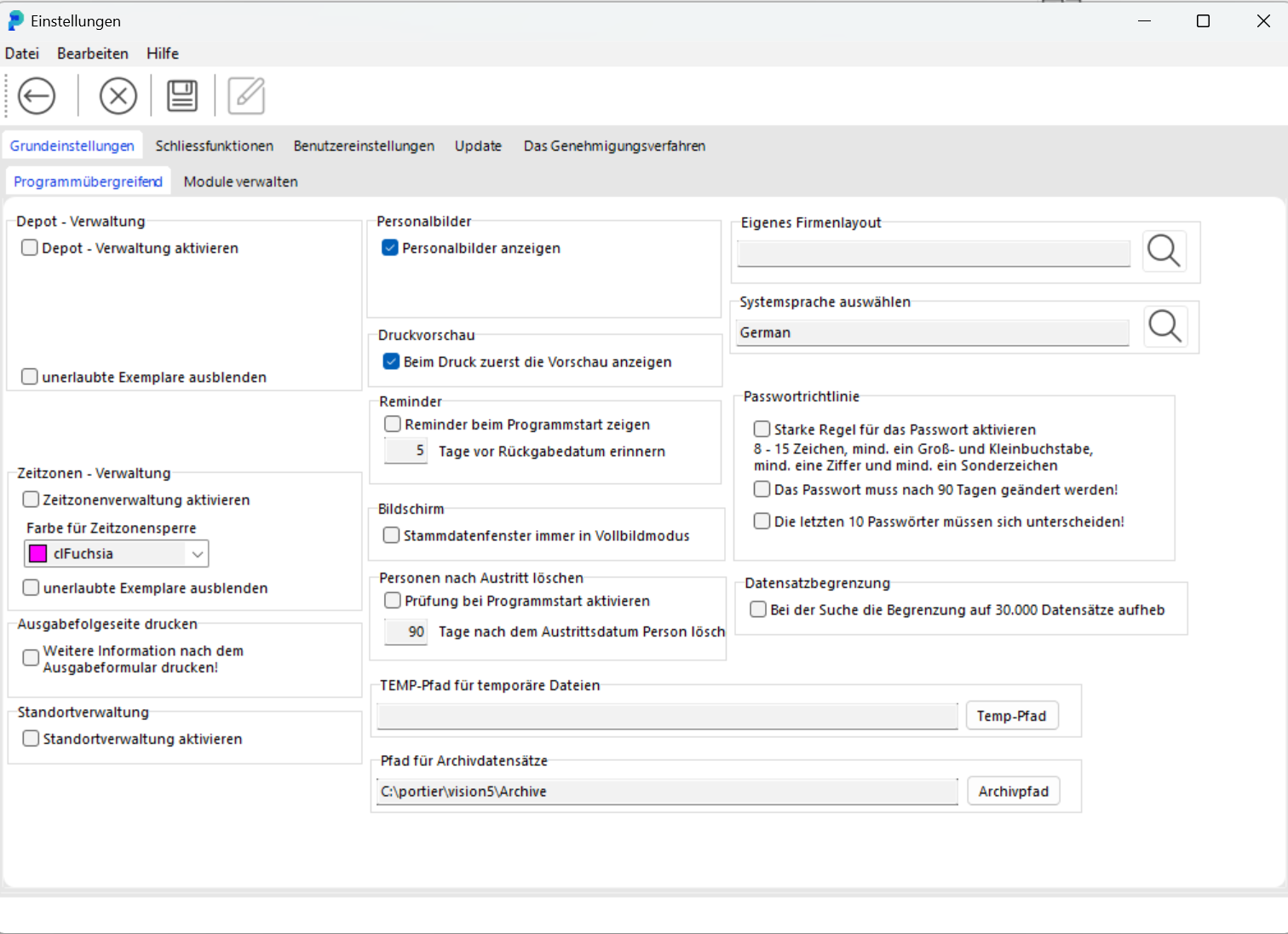
Enable Depot Management to manage depots. You can create new depots, edit or delete existing ones, and assign users and key copies to depots.
Time Zone Management lets you define time zones during which key issue is permitted. Outside these periods, key issue is blocked. This enables precise control over access management.
Enabling this option allows person photos to be displayed in the corresponding records. This makes it easier to identify users in user management or as key holders.
When Print Preview is enabled, a preview window is shown before every print operation. This lets you confirm that documents are correctly formatted before final printing.
This function reminds you at program start of any pending actions, for example when a return date is approaching. You can set how many days in advance you wish to be reminded about returns.
When this option is active, the master data window always opens in full screen mode. This improves the overview when working with large amounts of data.
With this setting, you can specify that persons are automatically deleted from the system after a defined period (e.g. 90 days after departure). This helps keep the database clean and compliant with data protection requirements.
Upload a custom company logo here to personalise portier® VISION.
This setting lets you select the system language, e.g. German, English, or French, to adapt the user interface to the preferred language.
Define the password rules here, such as minimum length, required special characters, or how frequently the password must be changed. You can also require that users change their password at next login.
This setting removes the limit on the number of records displayed in search results. By default, results are capped at 30,000 records. This option is useful when working with very large datasets.
Set the path for temporary files created during operation of portier® VISION. This path is used for intermediate storage.
Define the storage location for archived documents managed in the portier® VISION document archive. This includes documents such as approvals, contracts, and other relevant records.
Hide invalid copies: hides non-permitted key copies from the list.
Print issue follow-up page: after printing a key issue slip, an additional follow-up page is printed automatically.
The extensive settings in portier® VISION allow you to tailor the system to your specific needs and ensure high efficiency in daily operations.