Personnel data for people who may later receive keys must be prepared in a specific format called CSV.
The file must also conform to a specific structure definition.
A sample file (template) and, for administrators, a clear definition file are available on the portier CD and online.
How to proceed:
In the menu, click Data, then select Personnel Data Import.
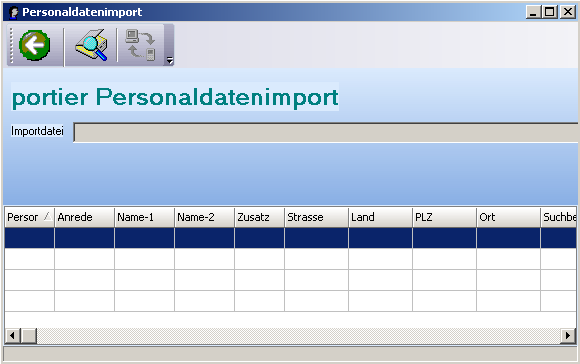
The Personnel Data Import window opens.
Click the  button and browse to the location and name of the CSV file to be imported.

Start the import by clicking Start Update.
Close the import window by clicking Exit Program.
The following fields can be imported:
Field Name | Field Length | Field Type | Notes
Personnel Number | 15 | alphanumeric |
Salutation | 10 | alphanumeric | Selection field
Name_1 | 40 | alphanumeric | Surname or company name
Name_2 | 40 | alphanumeric | First name or employee name for external company
Additional | 40 | alphanumeric | Text field
Street | 40 | alphanumeric | Text field
Country | 2 | alphanumeric | Text field
Postcode | 5 | numeric |
City | 40 | alphanumeric |
Search Term | 40 | alphanumeric | Pre-filled with Name_1 automatically; can be overwritten
Phone (Work) | 30 | alphanumeric |
Phone (Private) | 30 | alphanumeric |
Fax | 30 | alphanumeric |
Mobile | 30 | alphanumeric | Mobile number
E-Mail | 50 | alphanumeric | Format: name@provider.com
Web | 80 | alphanumeric | Format: www.name.com
Department | 50 | alphanumeric | AW field
Division | 50 | alphanumeric | AW field
Cost Centre | 50 | alphanumeric | AW field
Role/Activity | 50 | alphanumeric | AW field
Office Room | 50 | alphanumeric | AW field
Employee Status | 50 | alphanumeric | AW field
Employed Since | 10 | Date field | Format: DD.MM.YYYY
Time | 5 | alphanumeric | Format: HH:MM
End of Employment | 10 | Date field | Format: DD.MM.YYYY
Competency Level | 2 | numeric, range | 0–15
Please note that the Date of Birth and Notes fields cannot be imported.